Every year, thousands of NEET aspirants complete most of their application form successfully, only to get stuck at one stage—document upload.
A photo that's too large.
A signature that's too blurry.
A file saved in the wrong format.
Simple issues like these can delay registration and create unnecessary stress.
That's why understanding the documents required for NEET 2026 and preparing them correctly is just as important as filling out your academic details. The National Testing Agency (NTA) follows specific guidelines regarding image size, format, quality, and dimensions. Even a small mismatch can cause upload errors or form rejection.
The good news?
You don't need advanced editing skills or expensive software to resize your NEET photo and signature files. With a few simple steps, you can prepare compliant documents and complete your registration smoothly.
This guide covers everything you need to know.
Documents Required for NEET 2026 Registration
Before resizing any image, make sure you have all the documents required for NEET 2026 ready.
Generally, candidates should keep the following documents prepared:
Essential Documents
Passport-size photograph
Postcard-size photograph (4" × 6")
Candidate's signature
Left-hand thumb impression
Right-hand thumb impression
Class 10 certificate or birth proof
Valid photo identity proof
Category-Specific Documents
SC/ST/OBC certificate (if applicable)
EWS certificate (if applicable)
PwBD certificate (if applicable)
OCI/NRI supporting documents (if applicable)
Having these files scanned and organised beforehand can make the application process much easier.
NEET 2026 Photo and Signature Specifications

Many upload issues happen because students don't know the official requirements.
Let's simplify them.
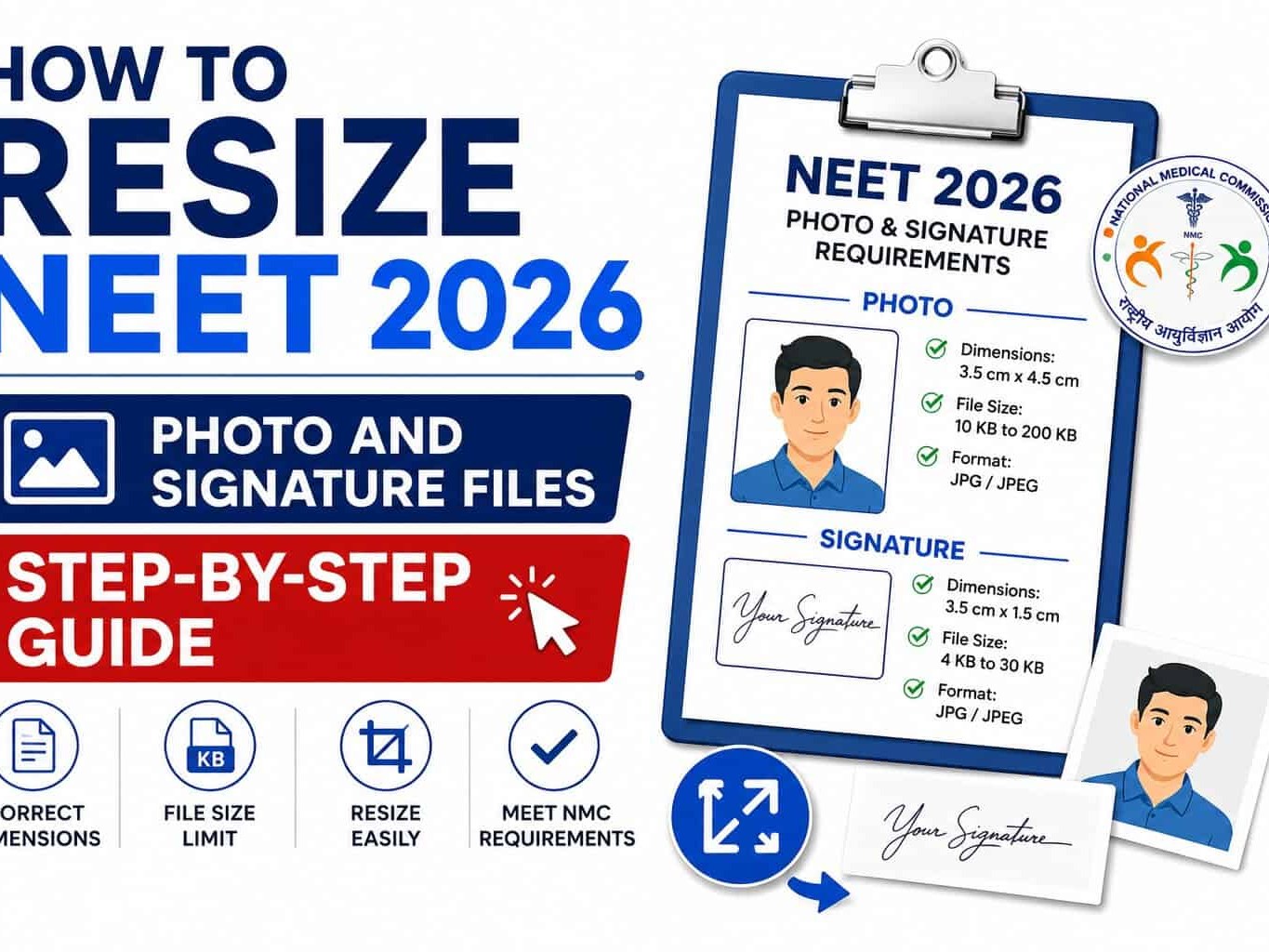
NEET 2026 Photograph Specifications
Your passport-size photograph should meet the following criteria:
Format: JPG/JPEG
File Size: 10 KB to 200 KB
Background: White
Face Visibility: Approximately 80%
Type: Recent colour photograph
Photo Date: Recent photograph as per current guidelines
The image should clearly show:
Full face
Ears
Neck area
Neutral facial expression
Avoid filters, excessive editing, or heavily compressed images.
NEET 2026 Signature Specifications
Your signature should follow these rules:
Format: JPG/JPEG
File Size: 4 KB to 30 KB
Ink Colour: Black pen
Background: White paper
Style: Running handwriting
Capital Letters: Not accepted
The signature must look exactly like the one you will use during future verification processes.
Why Students Face Upload Errors
Students often believe that taking a photo and scanning a signature is enough.
Unfortunately, that's not always true.
The NEET portal checks:
File size
Image format
Resolution
Background quality
Image clarity
Signature visibility
Face recognition standards
Common reasons for upload failure include:
Photo Issues
Wrong file format
Oversized image
Blurry photo
Selfie-style photograph
Dark background
Edited or filtered image
Signature Issues
Signature in capital letters
Excessive white space
Blurred scan
Incorrect file size
Improper cropping
Many students also compress files too aggressively, making them unreadable.
The goal is not just reducing file size—it's maintaining quality while staying within the limits.
How to Resize NEET 2026 Photo Files
Resizing your photograph is easier than most students expect.
Step 1: Start With a High-Quality Photo
Ensure:
White background
Good lighting
Clear facial visibility
No filters
No shadows
The better the original image, the easier the resizing process becomes.
Step 2: Convert to JPG/JPEG
Many smartphones save images in:
HEIC
PNG
WEBP
Convert these into JPG/JPEG before uploading.
The NEET portal primarily accepts JPG/JPEG files.
Step 3: Check Current File Size
On a computer:
Right-click the image
Select Properties
View file size
If the image exceeds 200 KB, you'll need compression.
Step 4: Resize Dimensions
Reduce image dimensions gradually.
Avoid excessive compression in a single step.
Aim for:
Clear visibility
Sharp facial features
Acceptable file size
Step 5: Verify Before Upload
Final checklist:
JPG/JPEG format
10 KB–200 KB size
Clear face visibility
White background
No distortion
How to Resize NEET 2026 Signature Files
The signature upload often causes even more confusion than the photograph.
Why?
Because signatures occupy a very small area while still requiring clarity.
Step 1: Sign Properly
Use:
Black ink pen
White paper
Avoid:
Coloured paper
Digital signatures
Pencil signatures
Step 2: Scan Clearly
Use:
Scanner app
Flatbed scanner
High-quality mobile scanner
Ensure the signature remains sharp and readable.
Step 3: Crop Excess White Space
This is one of the easiest ways to reduce file size.
Many students accidentally upload the entire page instead of cropping around the signature.
Proper cropping instantly reduces file size.
Step 4: Compress Carefully
The target range is:
4 KB to 30 KB
Do not over-compress.
If the signature becomes pixelated or blurry, the upload may fail.
Step 5: Save in JPG Format
Always save the final file as:
JPG
JPEG
Then verify size and clarity before uploading.
Best Tools to Resize NEET Documents
You don't need professional editing software.
Most students successfully resize their NEET documents using free tools.
Desktop Options
Microsoft Paint
Paint.NET
Windows Photos
Preview (Mac)
Mobile Apps
Adobe Scan
Image Compressor
Photo Resizer
CamScanner
Online Tools
TinyJPG
ILoveIMG
CompressJPEG
ImageResizer
The best approach is to reduce file size gradually while preserving image quality.
Common Mistakes to Avoid During Upload
Every year, students repeat the same mistakes.
Avoid these and your upload process becomes much smoother.
Uploading PNG Instead of JPG
The portal generally expects JPG/JPEG format.
Using Old Photographs
Always use a recent photograph that follows the latest NEET guidelines.
Excessive Compression
A smaller file isn't always better.
If clarity suffers, the image may be rejected.
Signature in Capital Letters
A signature written entirely in block capitals is generally not accepted.
Use your normal running signature.
Wrong Background
White backgrounds remain the safest choice for NEET photographs.
Uploading Uncropped Scans
Large blank spaces increase file size unnecessarily.
Always crop tightly around the image.
Waiting Until the Last Day
Many upload issues occur because students rush.
Preparing all documents required for NEET 2026 in advance helps avoid last-minute panic.
Final Checklist Before Form Submission
Before clicking submit, review everything carefully.
Photograph Checklist
JPG/JPEG format
Between 10 KB and 200 KB
White background
Face clearly visible
Recent image
Signature Checklist
JPG/JPEG format
Between 4 KB and 30 KB
Black ink on white paper
Running handwriting
Properly cropped
Document Checklist
Identity proof ready
Class 10 certificate available
Category certificates prepared
Thumb impressions scanned
All files clearly visible
Taking five minutes to verify these details can save hours of troubleshooting later.
Conclusion
Preparing the documents required for NEET 2026 is one of the most important parts of the application process.
A perfectly completed form can still face issues if the uploaded photograph or signature doesn't meet the required specifications.
Fortunately, resizing NEET documents is simple when you understand the rules. By following the correct file size limits, using JPG/JPEG formats, and maintaining image clarity, you can avoid most common upload errors.
Think of document preparation as the first step toward your medical journey.
Get it right once.
And focus your energy where it truly matters—preparing for NEET.
Article Stats
You Might Also Like
What Is the MS Course? A Complete Guide to Introduction, Eligibility, NEET PG Counselling and Preparation

What Is the MD Course? A Complete Guide to Introduction, Eligibility, NEET PG Counselling and Preparation
Tripura MBBS BDS Round 3 Re-Revised Schedule 2026: Choice Filling, Merit List, Allotment and Admission Dates